


微服务架构,首先是服务化,就是将单体架构中的功能模块从单体应用中拆分出来,独立部署为多个服务。同时要满足下面的一些特点:
单一职责:一个微服务负责一部分业务功能,并且其核心数据不依赖于其它模块。
团队自治:每个微服务都有自己独立的开发、测试、发布、运维人员。
服务自治:每个微服务都独立打包部署,访问自己独立的数据库。并且要做好服务隔离,避免对其它服务产生影响
分布式就是服务拆分的过程,其实微服务架构正是分布式架构的一种最佳实践的方案。
SpringCloud
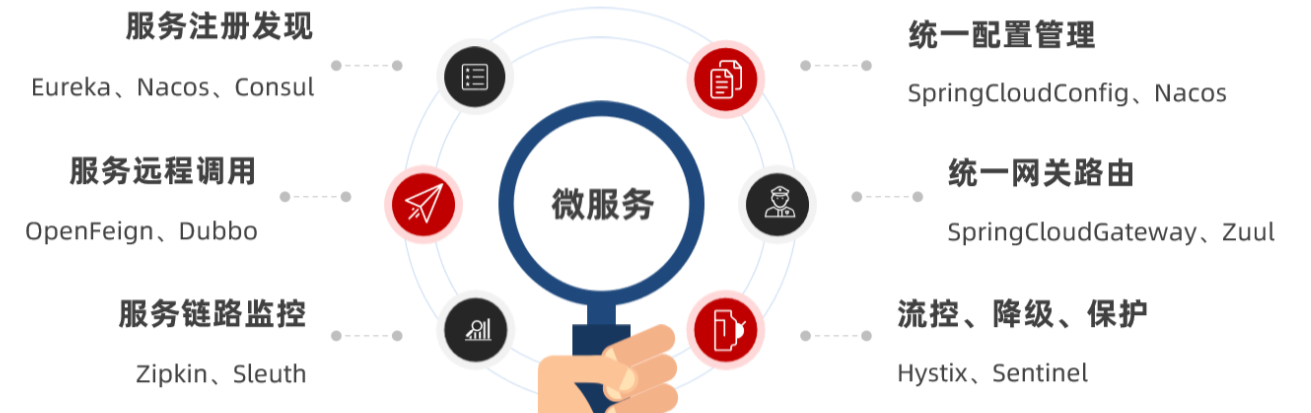
微服务拆分以后碰到的各种问题都有对应的解决方案和微服务组件,而SpringCloud框架可以说是目前Java领域最全面的微服务组件的集合了。
Alibaba的微服务产品SpringCloudAlibaba目前也成为了SpringCloud组件中的一员
服务调用
RestTemplate
Spring给我们提供了一个RestTemplate的API,可以方便的实现Http请求的发送。
常见的Get、Post、Put、Delete请求都支持,如果请求参数比较复杂,还可以使用exchange方法来构造请求。
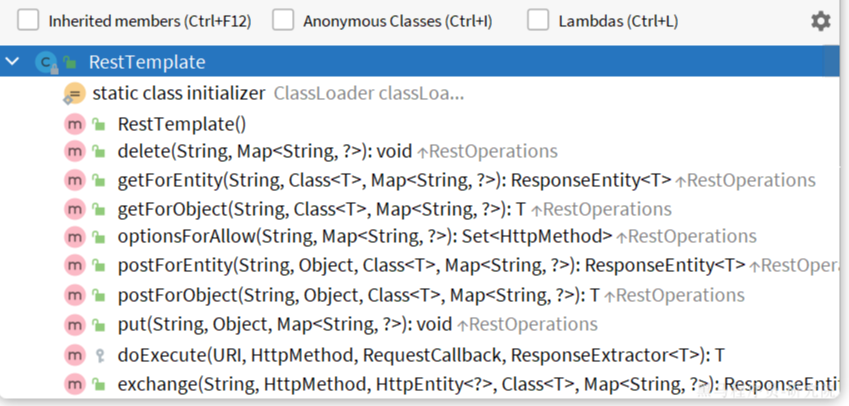
先将RestTemplate注册为一个Bean:
package com.hmall.cart.config;

import org.springframework.context.annotation.Bean;
import org.springframework.context.annotation.Configuration;
import org.springframework.web.client.RestTemplate;

@Configuration
public class RemoteCallConfig {

    @Bean
    public RestTemplate restTemplate() {
        return new RestTemplate();
    }
}
利用RestTemplate发起http请求,得到http的响应
ResponseEntity<List<ItemDTO>> response = restTemplate.exchange(
            "http://localhost:8081/items?ids={ids}",
            HttpMethod.GET,
            null,
            new ParameterizedTypeReference<List<ItemDTO>>() {
            },
            Map.of("ids", CollUtil.join(itemIds, ","))
    );
服务注册和发现
注册中心原理
在微服务远程调用的过程中,包括两个角色:
服务提供者:提供接口供其它微服务访问
服务消费者:调用其它微服务提供的接口
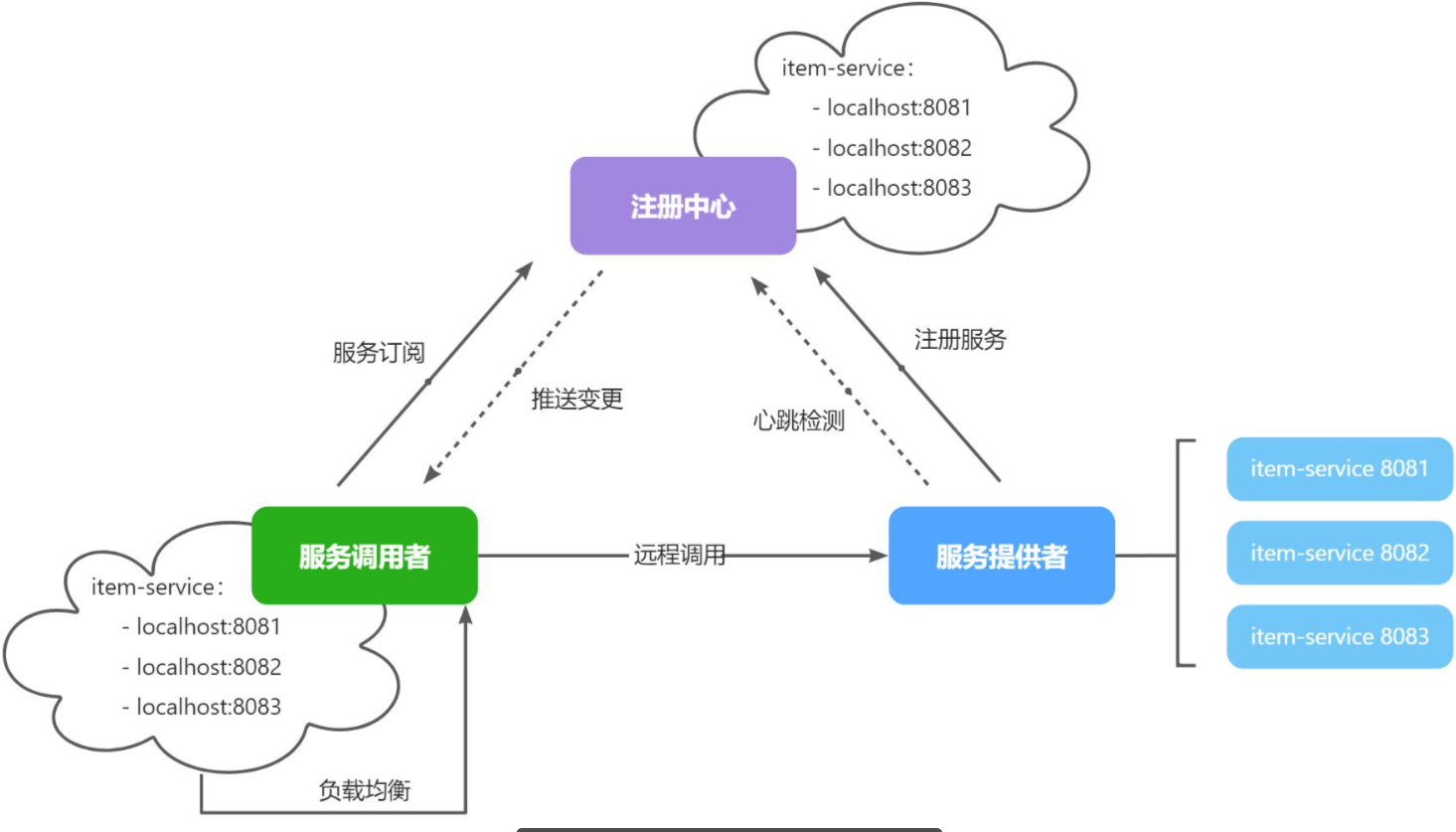
目前开源的注册中心框架有很多,国内比较常见的有:
Eureka:Netflix公司出品,目前被集成在SpringCloud当中,一般用于Java应用
Nacos:Alibaba公司出品,目前被集成在SpringCloudAlibaba中,一般用于Java应用
Consul:HashiCorp公司出品,目前集成在SpringCloud中,不限制微服务语言
Nacos服务注册
添加依赖
在pom.xml中添加依赖:
<!--nacos 服务注册发现-->
<dependency>
    <groupId>com.alibaba.cloud</groupId>
    <artifactId>spring-cloud-starter-alibaba-nacos-discovery</artifactId>
</dependency>
3.3.2.配置Nacos
在item-service的application.yml中添加nacos地址配置:
spring:
  application:
    name: service # 服务名称
  cloud:
    nacos:
      server-addr: 192.168.150.101:8848 # nacos地址
Nacos服务发现
引入依赖
服务发现除了要引入nacos依赖以外,由于还需要负载均衡,因此要引入SpringCloud提供的LoadBalancer依赖。
pom.xml中添加下面的依赖:
<!--nacos 服务注册发现-->
<dependency>
    <groupId>com.alibaba.cloud</groupId>
    <artifactId>spring-cloud-starter-alibaba-nacos-discovery</artifactId>
</dependency>
可以发现,这里Nacos的依赖于服务注册时一致,这个依赖中同时包含了服务注册和发现的功能。因为任何一个微服务都可以调用别人,也可以被别人调用,即可以是调用者,也可以是提供者。
配置Nacos地址
在cart-service的application.yml中添加nacos地址配置:
spring:
  cloud:
    nacos:
      server-addr: 192.168.150.101:8848
发现并调用服务
接下来,服务调用者就可以去订阅服务了。不过service有多个实例,而真正发起调用时只需要知道一个实例的地址。
因此,服务调用者必须利用负载均衡的算法,从多个实例中挑选一个去访问。常见的负载均衡算法有:
随机
轮询
IP的hash
最近最少访问
...
这里我们可以选择最简单的随机负载均衡。
服务发现
DiscoveryClient
Spring Cloud 提供了 DiscoveryClient 接口,用于从注册中心获取服务实例信息。通过 DiscoveryClient,服务调用者可以动态地获取服务提供者的实例列表,实现负载均衡和服务调用。
首先,在服务调用者的代码中注入 DiscoveryClient:
import org.springframework.cloud.client.discovery.DiscoveryClient;
import org.springframework.beans.factory.annotation.Autowired;

@Autowired
private DiscoveryClient discoveryClient;
然后,可以通过 discoveryClient 获取指定服务的实例列表:
List<ServiceInstance> instances = discoveryClient.getInstances("service-name");
接着,可以根据实例列表实现负载均衡,选择一个实例进行服务调用:
ServiceInstance selectedInstance = instances.get(new Random().nextInt(instances.size()));
String serviceUrl = selectedInstance.getUri().toString();
最后,可以使用 RestTemplate 发起服务调用:
RestTemplate restTemplate = new RestTemplate();
ResponseEntity<String> response = restTemplate.getForEntity(serviceUrl + "/endpoint", String.class);
OpenFeign
使用方法
引入依赖
在服务的pom.xml中引入OpenFeign的依赖和loadBalancer依赖:
  <!--openFeign-->
  <dependency>
      <groupId>org.springframework.cloud</groupId>
      <artifactId>spring-cloud-starter-openfeign</artifactId>
  </dependency>
  <!--负载均衡器-->
  <dependency>
      <groupId>org.springframework.cloud</groupId>
      <artifactId>spring-cloud-starter-loadbalancer</artifactId>
  </dependency>
启用OpenFeign
接下来,我们在cart-service的CartApplication启动类上添加注解,启动OpenFeign功能:
编写OpenFeign客户端
定义一个新的接口,编写Feign客户端:
其中代码如下:
package com.hmall.cart.client;

import com.hmall.cart.domain.dto.ItemDTO;
import org.springframework.cloud.openfeign.FeignClient;
import org.springframework.web.bind.annotation.GetMapping;
import org.springframework.web.bind.annotation.RequestParam;

import java.util.List;

@FeignClient("item-service")
public interface ItemClient {

    @GetMapping("/items")
    List<ItemDTO> queryItemByIds(@RequestParam("ids") Collection<Long> ids);
}
这里只需要声明接口,无需实现方法。接口中的几个关键信息:
@FeignClient("item-service"):声明服务名称@GetMapping:声明请求方式@GetMapping("/items"):声明请求路径@RequestParam("ids") Collection<Long> ids:声明请求参数List<ItemDTO>:返回值类型
有了上述信息,OpenFeign就可以利用动态代理帮我们实现这个方法,并且向http://item-service/items发送一个GET请求,携带ids为请求参数,并自动将返回值处理为List<ItemDTO>。
我们只需要直接调用这个方法,即可实现远程调用了。
连接池
Feign底层发起http请求,依赖于其它的框架。其底层支持的http客户端实现包括:
HttpURLConnection:默认实现,不支持连接池
Apache HttpClient :支持连接池
OKHttp:支持连接池
因此我们通常会使用带有连接池的客户端来代替默认的HttpURLConnection。比如,我们使用OK Http.
引入依赖
在cart-service的pom.xml中引入依赖:
<!--OK http 的依赖 -->
<dependency>
  <groupId>io.github.openfeign</groupId>
  <artifactId>feign-okhttp</artifactId>
</dependency>
开启连接池
在cart-service的application.yml配置文件中开启Feign的连接池功能:
feign:
  okhttp:
    enabled: true # 开启OKHttp功能
重启服务,连接池就生效了。
Comments