


easy-es
官方文档
配置
application.yml
easy-es:
  compatible: true
  enable: true
  address: 192.168.1.129:9200  #填你的es连接地址
  username: elastic
  password: elastic

logging:
  level:
    tracer: trace # 设置日志级别为trace,开发时可开启以打印ES全部请求信息及DSL语句
Spring Boot 启动类
@EsMapperScan("org.kele.mapper")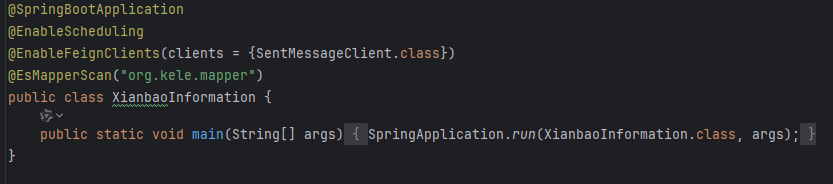
实体类
示例:
@Data
@IndexName("product_info")
public class ProductInfo implements Serializable {
    // 序列化版本号(避免反序列化异常)
    @Serial
    private static final long serialVersionUID = 1L;

    // 1. 内容唯一标识字段
    /** 内容唯一ID(主键) */
    @IndexId(type = IdType.CUSTOMIZE)
    private String id;

    /** 内容网页访问地址(相对路径) */
    @IndexField(fieldType = FieldType.KEYWORD)
    private String url;

    /** 发布时间戳(Unix时间,单位:秒) */
    @IndexField(fieldType = FieldType.LONG)
    private String shijianchuo;

    // 2. 内容主体字段
    /** 内容标题(商品名/活动主题/标识编码) */
    @IndexField(fieldType = FieldType.TEXT, analyzer = Analyzer.IK_MAX_WORD, searchAnalyzer = Analyzer.IK_SMART)
    private String title;

    /** 内容纯文本正文(活动规则/商品信息) */
    @IndexField(fieldType = FieldType.TEXT, analyzer = Analyzer.IK_MAX_WORD, searchAnalyzer = Analyzer.IK_SMART)
    private String content;

    /** 带HTML标签的正文(含图片、链接、样式,用于网页展示) */
    @IndexField(fieldType = FieldType.TEXT, analyzer = Analyzer.IK_MAX_WORD, searchAnalyzer = Analyzer.IK_SMART)
    private String contentHtml;

    // 3. 发布与分类字段
    /** 发布日期(格式:YYYY-MM-DD) */
    @IndexField(fieldType = FieldType.KEYWORD)
    private String datetime;

    /** 发布具体时间(格式:HH:mm) */
    @IndexField(fieldType = FieldType.KEYWORD)
    private String shorttime;

    /** 分类ID(数字字符串,对应分类体系) */
    @IndexField(fieldType = FieldType.KEYWORD)
    private String cateid;

    /** 分类名称(如"微博情报-食品-淘宝|猫超") */
    @IndexField(fieldType = FieldType.KEYWORD)
    private String catename;

    /** 楼主(内容发布者昵称) */
    @IndexField(fieldType = FieldType.TEXT, analyzer = Analyzer.IK_MAX_WORD)
    private String louzhu;

    /** 楼主注册时间(可为null,未记录时为null) */
    @IndexField(fieldType = FieldType.KEYWORD)
    private String louzhuregtime;

    // 4. 互动数据字段
    /** 内容评论数(0-20) */
    @IndexField(fieldType = FieldType.INTEGER)
    private Integer comments;
}
@Settings
描述:索引Settings信息注解,可设置ES索引中的Settings信息
使用位置:实体类
@Settings(shardsNum = 3, replicasNum = 2, settingsProvider = MySettingsProvider.class)
public class Document {
    // 省略其它字段
}
@IndexName
描述:索引名注解,标识实体类对应的索引 对应MP的@TableName注解,在v0.9.40之前此注解为@TableName.
使用位置:实体类
@IndexName
public class Document {
    // 省略其它字段
}
@IndexId(opens new window)
描述:ES主键注解
使用位置:实体类中被作为ES主键的字段, 对应MP的@TableId注解
public class Document {
    @IndexId
    private String id;
    // 省略其它字段
}
@IndexField
描述:ES字段注解, 对应MP的@TableField注解
使用位置:实体类中被作为ES索引字段的字段
使用场景举例:
实体类中的字段并非ES中实际的字段,比如把实体类直接当DTO用了,加了一些ES中并不存在的无关字段,此时可以标记此字段,以便让EE框架跳过此字段,对此字段不处理.
字段的更新策略,比如在调用更新接口时,实体类的字段非Null或者非空字符串时才更新,此时可以加字段注解,对指定字段标记更新策略.
需要对类型为text或keyword_tex字段聚合时,可指定其fieldData=true,否则es会报错.
对指定字段进行自定义命名,比如该字段在es中叫wu-la,但在实体model中叫ula,此时可以在value中指定value="wu-la".
在自动托管索引模式下,可指定索引分词器及索引字段类型.
在自动托管索引模式下,可指定索引中日期的format格式.
可指定创建索引时,自动对指定字段添加忽略大小写的配置.
可指定稠密向量类型,支持向量检索.
可指定复制字段,复制某个字段至指定字段,支持将多个字段值复制到同一字段,然后就可以只用一个字段即可实现多字段检索,在某些场景下可提升查询性能.
...
使用示例:
public class Document {
    // 此处省略其它字段...

    // 场景一:标记es中不存在的字段
    @IndexField(exist = false)
    private String notExistsField;

    // 场景二:更新时,此字段非空字符串才会被更新
    @IndexField(strategy = FieldStrategy.NOT_EMPTY)
    private String creator;

    // 场景三: 指定fieldData
    @IndexField(fieldType = FieldType.TEXT, fieldData = true)
    private String filedData;

    // 场景四:自定义字段名
    @IndexField("wu-la")
    private String ula;

    // 场景五:支持日期字段在es索引中的format类型
    @IndexField(fieldType = FieldType.DATE, dateFormat = "yyyy-MM-dd HH:mm:ss||yyyy-MM-dd||epoch_millis")
    private String gmtCreate;

    // 场景六:支持指定字段在es索引中的分词器类型
    @IndexField(fieldType = FieldType.TEXT, analyzer = Analyzer.IK_SMART, searchAnalyzer = Analyzer.IK_MAX_WORD)
    private String content;

    // 场景七:支持指定字段在es的索引中忽略大小写,以便在term查询时不区分大小写,仅对keyword类型字段生效,es的规则,并非框架限制.
    @IndexField(fieldType = FieldType.KEYWORD, ignoreCase = true)
    private String caseTest;

    // 场景八:支持稠密向量类型 稠密向量类型,dims必须同时指定,非负 最大为2048
    @IndexField(fieldType = FieldType.DENSE_VECTOR, dims = 3)
    private double[] vector;

    // 场景九:支持复制字段,复制当前字段至指定字段,支持将多个字段值复制到同一字段,与原生用法一致
    @IndexField(copyTo = "creator")
    private String copiedField;
}
@HighLight(opens new window)
描述:高亮注解
使用位置:实体类中需要高亮的被查询字段
使用场景举例:比如输入关键词"老汉"进行查询,期望内容中包含"老汉"的部分被展示为红色或加粗
编写Mapper类
@Component
public interface ProductInfoMapper extends BaseEsMapper<ProductInfo>{
}
CRUD操作
CRUD索引
API介绍
// 1.根据当前mapper对应实体类信息及其注解配置生成索引信息 适用于大多数场景
Boolean createIndex();

// 2.根据当前mapper对应实体类信息及其注解配置生成索引信息 可指定索引名进行创建 适用于定时任务按日期创建索引场景
Boolean createIndex(String indexName);

// 3.根据自定义条件创建索引
Boolean createIndex(Wrapper<T> wrapper);
创建索引一共提供了上述三种方式,使用难度: 方式1 <= 方式2 < 方式3 , 灵活度 方式3 > 方式2 >= 方式1
使用案例:
    /**
     * 方式1
     */
    @Test
    public void testCreateIndexByEntity() {
        // 绝大多数场景推荐使用 简单至上
        documentMapper.createIndex();
    }

    /**
     * 方式2
     */
    @Test
    public void testCreateIndexByEntity() {
        // 适用于定时任务按日期创建索引场景
        String indexName = LocalDate.now().format(DateTimeFormatter.ofPattern("yyyy-MM-dd"));
        documentMapper.createIndex(indexName);
    }

    /**
     * 方式3
     */
    @Test
    public void testCreateIndex() {
        // 复杂场景使用
        LambdaEsIndexWrapper<Document> wrapper = new LambdaEsIndexWrapper<>();
        // 此处简单起见 索引名称须保持和实体类名称一致,字母小写 后面章节会教大家更如何灵活配置和使用索引
        wrapper.indexName(Document.class.getSimpleName().toLowerCase());

        // 此处将文章标题映射为keyword类型(不支持分词),文档内容映射为text类型(支持分词查询)
        wrapper.mapping(Document::getTitle, FieldType.KEYWORD, 2.0f)
                .mapping(Document::getLocation, FieldType.GEO_POINT)
                .mapping(Document::getGeoLocation, FieldType.GEO_SHAPE)
                .mapping(Document::getContent, FieldType.TEXT, Analyzer.IK_SMART, Analyzer.IK_MAX_WORD);

        // 0.9.8+版本,增加对符串字段名称的支持,Document实体中须在对应字段上加上@Tablefield(value="wu-la")用于映射此字段值
        wrapper.mapping("wu-la", FieldType.TEXT, Analyzer.IK_MAX_WORD, Analyzer.IK_MAX_WORD);

        // 设置分片及副本信息,可缺省
        wrapper.settings(3, 2);

        // 设置别名信息,可缺省
        String aliasName = "daily";
        wrapper.createAlias(aliasName);

        // 设置父子信息,若无父子文档关系则无需设置
        wrapper.join("joinField", "document", "comment");

        // 创建索引
        boolean isOk = documentMapper.createIndex(wrapper);
        Assertions.assertTrue(isOk);
    }

    /**
     * 方式3 变体,使用难度最高,但灵活性也最高
     */
    @Test
    public void testCreateIndexByMap() {
        // 演示通过自定义map创建索引,最为灵活 可支持es本身能支持的所有索引场景
        LambdaEsIndexWrapper<Document> wrapper = new LambdaEsIndexWrapper<>();
        wrapper.indexName(Document.class.getSimpleName().toLowerCase());
        wrapper.settings(3, 2);
        Map<String, Object> map = new HashMap<>();
        Map<String, Object> prop = new HashMap<>();
        Map<String, String> field = new HashMap<>();
        field.put("type", FieldType.KEYWORD.getType());
        prop.put("this_is_field", field);
        map.put("properties", prop);
        wrapper.mapping(map);
        boolean isOk = documentMapper.createIndex(wrapper);
        Assertions.assertTrue(isOk);
    }
查询索引
API介绍
// 是否存在索引
Boolean existsIndex(String indexName);

// 获取当前mapper对应索引信息
GetIndexResponse getIndex();

// 获取指定索引信息
GetIndexResponse getIndex(String indexName);
使用案例:
    @Test
    public void testExistsIndex() {
        // 测试是否存在指定名称的索引
        String indexName = Document.class.getSimpleName().toLowerCase();
        boolean existsIndex = documentMapper.existsIndex(indexName);
        Assertions.assertTrue(existsIndex);
    }

    @Test
    public void testGetIndex() {
        GetIndexResponse indexResponse = documentMapper.getIndex();
        // 这里打印下索引结构信息 其它分片等信息皆可从indexResponse中取
        indexResponse.getMappings().forEach((k, v) -> System.out.println(v.getSourceAsMap()));
    }
更新索引
API介绍
// 根据条件更新索引
Boolean updateIndex(Wrapper<T> wrapper);
使用案例:
    /**
     * 更新索引
     */
    @Test
    public void testUpdateIndex() {
        // 测试更新索引
        LambdaEsIndexWrapper<Document> wrapper = new LambdaEsIndexWrapper<>();
        // 指定要更新哪个索引
        String indexName = Document.class.getSimpleName().toLowerCase();
        wrapper.indexName(indexName);
        wrapper.mapping(Document::getCreator, FieldType.KEYWORD);
        wrapper.mapping(Document::getGmtCreate, FieldType.DATE);
        boolean isOk = documentMapper.updateIndex(wrapper);
        Assertions.assertTrue(isOk);
    }
删除索引
API介绍
// 删除指定索引 支持同时删多个索引,谨慎操作,后果自负,删除索引后数据也会被一起删除,类似Mysql中的删库跑路...
Boolean deleteIndex(String... indexNames);
使用案例:
    @Test
    public void testDeleteIndex() {
        // 指定要删除哪个索引
        String indexName = Document.class.getSimpleName().toLowerCase();
        boolean isOk = documentMapper.deleteIndex(indexName);
        Assertions.assertTrue(isOk);
    }
更新索引
提示
ES中数据的写入是近实时的,并不像传统关系型数据库,ES的数据写入后存在一定的延迟,写完立即查询很可能查不到,具体延迟多少是需要结合机器和ES配置共同决定的,ES从内存刷数据至磁盘是一个批处理,所以存在一定延迟,如果您对数据的实时性要求比较高, 我们推荐您参考配置章节配置数据刷新策略refresh-policy,当然您也可以通过调用下面提供的两个API,来实现刷新指定索引的数据,执行后数据将从内存load至磁盘.
API介绍
// 刷新当前mapper对应索引, 返回刷新成功分片数
Integer refresh();

// 刷新指定索引列表, 返回总刷新成功分片数
Integer refresh(String... indexNames);
使用案例:
    @Test
    public void testRefresh() {
        // 刷新当前mapper对应索引
        int successShardsCount = documentMapper.refresh();
}CRUD文档数据
Insert
// 插入一条记录,默认插入至当前mapper对应的索引
Integer insert(T entity);
// 插入一条记录 可指定具体插入的路由
Integer insert(String routing, T entity);
// 父子类型 插入一条记录 可指定路由, 父id
Integer insert(String routing, String parentId, T entity);
// 插入数据 可指定具体插入的索引,多个用逗号隔开
Integer insert(T entity, String... indexNames);
// 插入数据,可指定路由及多索引插入
Integer insert(String routing, T entity, String... indexNames);
// 父子类型 插入数据,可指定路由,父id及多索引插入
Integer insert(String routing, String parentId, T entity, String... indexNames);

// 批量插入多条记录
Integer insertBatch(Collection<T> entityList)
// 批量插入 可指定路由
Integer insertBatch(String routing, Collection<T> entityList);
// 父子类型 批量插入 可指定路由, 父id
Integer insertBatch(String routing, String parentId, Collection<T> entityList);

// 批量插入多条记录 可指定具体插入的索引,多个用逗号隔开
Integer insertBatch(Collection<T> entityList, String... indexNames);
// 批量插入 可指定路由及多索引
Integer insertBatch(String routing, Collection<T> entityList, String... indexNames);
// 父子类型 批量插入 可指定路由,父id及多索引
Integer insertBatch(String routing, String parentId, Collection<T> entityList, String... indexNames);
#参数说明
#Delete
// 根据 ID 删除
Integer deleteById(Serializable id);
// 根据 ID 删除 可指定路由
Integer deleteById(String routing, Serializable id);
// 根据 ID 删除 可指定具体的索引,多个用逗号隔开
Integer deleteById(Serializable id, String... indexNames);
// 根据 ID 删除 可指定路由及多索引
Integer deleteById(String routing, Serializable id, String... indexNames);

// 根据 entity 条件,删除记录
Integer delete(LambdaEsQueryWrapper<T> wrapper);

// 删除(根据ID 批量删除)
Integer deleteBatchIds(Collection<? extends Serializable> idList);
// 删除(根据ID 批量删除)可指定路由
Integer deleteBatchIds(String routing, Collection<? extends Serializable> idList);
// 删除(根据ID 批量删除)可指定具体的索引,多个用逗号隔开
Integer deleteBatchIds(Collection<? extends Serializable> idList, String... indexNames);
// 删除(根据ID 批量删除) 可指定路由及多索引
Integer deleteBatchIds(String routing, Collection<? extends Serializable> idList, String... indexNames);
#参数说明
#Update
//根据 ID 更新
Integer updateById(T entity);
// 根据 ID 更新 可指定路由
Integer updateById(String routing, T entity);
// 根据 ID 更新 可指定具体的索引,多个用逗号隔开
Integer updateById(T entity, String... indexNames);
// 根据 ID 更新 可指定路由和多索引
Integer updateById(String routing, T entity, String... indexNames);


// 根据ID 批量更新
Integer updateBatchByIds(Collection<T> entityList);
// 根据ID 批量更新 可指定路由
Integer updateBatchByIds(String routing, Collection<T> entityList);

//根据 ID 批量更新 可指定具体的索引,多个用逗号隔开
Integer updateBatchByIds(Collection<T> entityList, String... indexNames);
// 根据ID 批量更新 可指定路由及多索引
Integer updateBatchByIds(String routing, Collection<T> entityList, String... indexNames);

// 根据动态条件 更新记录
Integer update(T entity, LambdaEsUpdateWrapper<T> updateWrapper);
#参数说明
#Select
	// 获取总数
    Long selectCount(LambdaEsQueryWrapper<T> wrapper);
    // 获取总数 distinct为是否去重 若为ture则必须在wrapper中指定去重字段
    Long selectCount(Wrapper<T> wrapper, boolean distinct);

 	// 根据 ID 查询
    T selectById(Serializable id);
    // 根据 ID 查询 可指定路由
    T selectById(String routing, Serializable id);

    // 根据 ID 查询 可指定具体的索引,多个用逗号隔开
    T selectById(Serializable id, String... indexNames);
    // 根据 ID 查询 可指定路由及多索引
    T selectById(String routing, Serializable id, String... indexNames);

    // 查询(根据ID 批量查询)
    List<T> selectBatchIds(Collection<? extends Serializable> idList);
    // 查询(根据ID 批量查询) 可指定路由
    List<T> selectBatchIds(String routing, Collection<? extends Serializable> idList);

    // 查询(根据ID 批量查询)可指定具体的索引,多个用逗号隔开
    List<T> selectBatchIds(Collection<? extends Serializable> idList, String... indexNames);
    // 查询(根据ID 批量查询) 可指定路由及多索引
    List<T> selectBatchIds(String routing, Collection<? extends Serializable> idList, String... indexNames);

    // 根据动态查询条件,查询一条记录 若存在多条记录 会报错
    T selectOne(LambdaEsQueryWrapper<T> wrapper);
    // 根据动态查询条件,查询全部记录
    List<T> selectList(LambdaEsQueryWrapper<T> wrapper);
Comments